Closing ASA Communities FAQ
When will ASA Communities close?
ASA Communities will close on July 7, 2026, at 12 a.m. ET. Members will no longer be able to log in after that time.
What should I do before July 7?
Review your content and save or download any files, posts, messages, professional contacts, or other information you wish to retain before the platform closes. Instructions are available below.
How will I connect with other members during the interim period?
Our commitment to helping ASA members like you build relationships, exchange knowledge, and connect across the field of aging remains unchanged. Members may continue connecting through attending our annual On Aging Conference.
This summer, ASA is launching Community Groups — facilitated peer groups where members explore the issues, challenges, and opportunities that matter most to the aging field. Each group is focused on a specific topic, led by an ASA staff facilitator, and designed around the idea that the most valuable knowledge in this field is in the people doing the work. What’s learned in each group gets shared across the ASA community, so every member benefits. Community Groups are open to ASA members only. More information on schedule, topics, and how to sign up is coming in the weeks ahead.
What will happen to my personal data?
ASA will manage member information in accordance with its privacy and data-retention policies. You can view the full policy here.
Who should I contact with questions?
Please contact membership@asaging.org
How to Download Content from ASA Communities
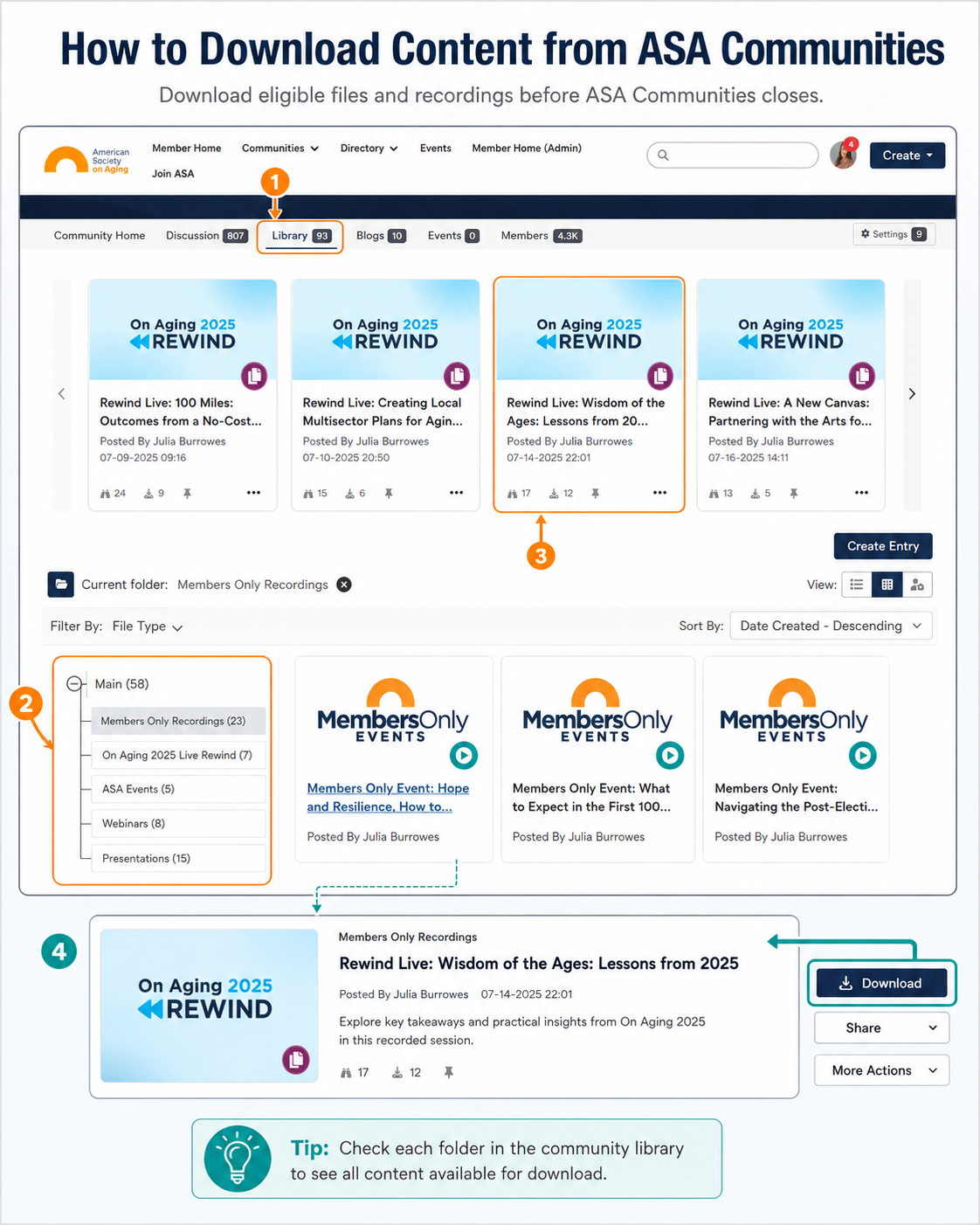
As ASA prepares to sunset ASA Communities, members may download eligible resources from community libraries before the platform closes.
To access available files and recordings:
1. Log in to ASA Communities.
2. Open the community where the content is housed.
3. Click the Library tab in the community navigation.
4. Select a library folder from the left-hand menu.
Please note: you will need to click into each community library or folder to see all eligible content available for download.
5. Click the title or thumbnail of the content you want to access.
6. Once the item opens, click Download to save the file to your device.
7. Repeat these steps for any additional files or recordings you would like to keep.
Members are encouraged to review all relevant community libraries and download any needed materials before ASA Communities is sunset on July 7, 2026.